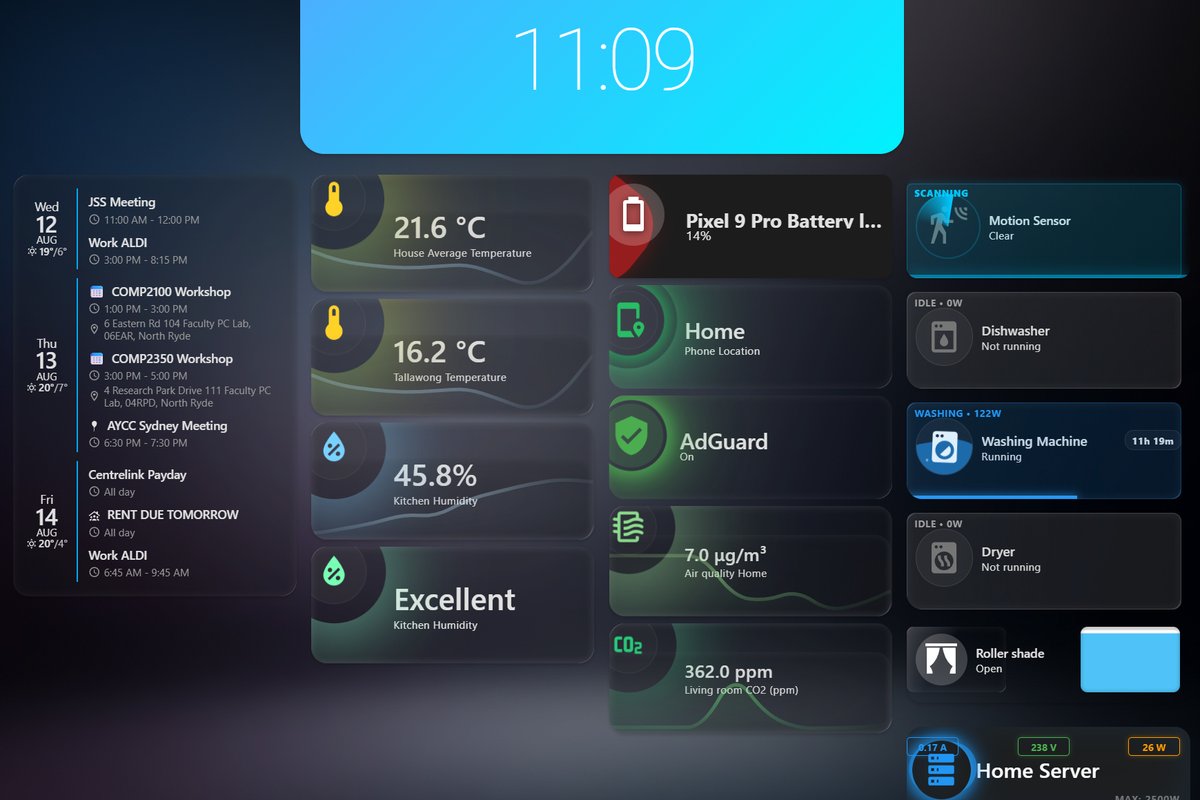
Home Lab: building a self-hosted network from scratch
What started as a small Raspberry Pi project has grown into a fully self-hosted home network — handling DNS/DHCP for every device in the house, a 20-sensor climate automation system, network-wide ad-blocking, private photo storage, and appliance-level power monitoring. Everything is self-hosted, remotely accessible, and built incrementally as I ran into the limits of whatever I'd built before.
The origin story
It started small: a Raspberry Pi Zero 2 W, with the goal of running Pi-hole (network ad-blocking) and Home Assistant (home automation) on it. It didn't take long to hit a wall — the Pi Zero 2 W simply didn't have the horsepower to run both reliably.
Rather than give up on the idea, I repurposed a decommissioned PC that would otherwise have gone to waste — wiped it, and turned it into a proper home server running ZimaOS, a lightweight, Docker-based operating system built for exactly this kind of self-hosting project. That single decision is what let the project actually scale into everything described below.
Architecture at a glance
The server runs on ZimaOS with everything containerised through Docker, which keeps each service isolated and easy to manage independently.
- ZimaOS / DockerThe base operating system and container runtime
- ImmichSelf-hosted photo and video backup
- AdGuard HomeNetwork-wide DNS filtering and DHCP
- Home AssistantAutomation hub, tied into a Zigbee sensor network
- Tuya integrationA second smart-device ecosystem for lighting and IR control
- TailscaleA VPN mesh network for secure remote access to the whole stack
Storage & personal cloud
The server currently provides 1TB of storage, accessible from anywhere on the home network. The standout piece here is Immich, a self-hosted alternative to iCloud/Google Photos — it automatically backs up photos and videos from every device in the house, which means everyone gets their cloud photo backup without handing that data to a third party, and phones stop running out of storage from a growing camera roll.
Taking over the network: AdGuard Home as DHCP/DNS
This is the part of the project I'm proudest of from a networking standpoint. Rather than just running AdGuard Home as a basic ad-blocker, I configured it to be the network's DHCP server — meaning the router itself now points to AdGuard for address assignment, and every device on the network resolves DNS through it by default. No per-device configuration, no opt-in required — the filtering and ad-blocking apply network-wide, automatically, the moment a device joins the Wi-Fi.
Going from "installed an app" to reconfiguring how the network itself assigns addresses and resolves domains — the kind of infrastructure change that's invisible when it works and breaks everything when it doesn't.
Sensor network: Zigbee & Home Assistant
The climate automation side of the project runs on Home Assistant, tied into a Zigbee mesh network:
20 temperature sensors
Spread throughout the house, connected via a Zigbee hub running on the home server.
Mesh range via repeaters
Zigbee is a mesh protocol — range and reliability became a real problem as the sensor count grew, solved by using Zigbee smart plugs as repeaters to strengthen and extend the mesh across the house.
Whole-home average
Sensor data feeds into a calculation of whole-home average temperature, rather than relying on any single reading.
That average, combined with indoor vs. outdoor temperature and time of day, drives automated control of the home's blinds:
This is a genuine closed-loop control system: sensors feed data in, logic processes it, and actuators (the blinds) respond automatically — no manual input.
Lighting & air quality automation: Tuya + IR
Alongside the Zigbee/Home Assistant side, the project also runs a second smart-device ecosystem through Tuya:
IKEA smart plugs
Relay signal around the house, extending the Tuya network's range the same way the Zigbee repeaters do for the sensor mesh.
Lighting control
The Tuya network controls the home's lighting.
IR blaster
Provides control over the TV and fans — devices without native smart connectivity, automated via infrared signals.
Air quality response
Air quality sensors feed into the automation logic: when air quality drops, fans and air purifiers trigger automatically, no manual intervention needed.
Appliance power monitoring
The dishwasher, washing machine, and dryer are all fitted with power monitoring, which tracks when each appliance is actually running and how much power each one draws during a cycle.
This turns three previously "dumb" appliances into ones with real usage visibility — useful for figuring out cycle timing, energy costs, and whether something's still running before leaving the house.
Remote access: Tailscale
Every part of this system — storage, Home Assistant, AdGuard, the whole stack — is accessible from anywhere via Tailscale, a mesh VPN. This means the network can be checked on, adjusted, or troubleshot remotely without exposing anything directly to the public internet, which matters a lot given how much of this system now controls physical things in the house.
Skills & technologies demonstrated
What's next
This project is still growing — it started with a single Pi and has already been rebuilt once to keep up with what I wanted it to do. Future additions I'm considering: expanding the sensor network further, adding more granular per-device network monitoring, and building out more advanced automation logic beyond the current temperature/air-quality triggers.